POLYU SCHOOL OF DESIGN · SD2112 · WEEK 04 · LECTURE + WORKSHOP
Language machines. From rules to agents.
Week 4 — the first of three tool weeks.
POLYU SCHOOL OF DESIGN · SD2112 · WEEK 04 · LECTURE + WORKSHOP
Language machines. From rules to agents.
Week 4 — the first of three tool weeks.
SD2112 · WEEK 04
Today
01
Two ways to teach a machine: a short recap
02
Language as rules: Chomsky and ELIZA
03
Language as examples: transformers, reasoning, rewards
04
Question answering, then agents
05
Harnesses: Machine A and Machine B together
06
Watch the demos · try one bounded task
07
Challenge 3 and the Week 7 reflection
SD2112 · AI IN DESIGN · WEEK 04
02

00 · DEEP EXERCISE · FROM THE LLM VIDEO
A model predicts the next token. What would you check before treating its fluent answer as evidence?
Use one example claim and name the source you would check.
SD2112 · AI IN DESIGN · WEEK 04
03
00 · A LANGUAGE MACHINE, THREE WAYS
From rules to patterns to actions.
RULES
A person writes them.
Machine A applies an explicit rule to the input.
EXAMPLES
A model learns patterns.
Machine B adjusts weights from examples.
ACTIONS
An agent uses tools.
A harness routes actions and observations around the model.
SD2112 · AI IN DESIGN · WEEK 04
04
00 · THE COURSE
Where we are
1 · What is AI?
Week 1
Two ways to teach a machine
Week 2
Rules that make things: code, chance, generative art
Week 3
Learning from examples: concepts, neurons, Move 37
2 · AI for the creative process
Week 4
Language machines: LLMs, prompts, agents
Week 5
Image machines: diffusion, CLIP, mediation
Week 6
Sound machines: music, voice, spectrograms
Mid-term
Week 7
Mid-term quiz · project pitches · teams · reflection due
3 · AI inside products
Week 8
AI as design material: use vs incorporate
Week 9
Data, bias and privacy
Week 10
Recommendation systems and the feed
4 · The designer's turn
Week 11
Curating outputs and datasets · authorship
Week 12
Language as an interface: chatbots and agents
Showcase
Week 13
Poster fair · final quiz
SD2112 · AI IN DESIGN · WEEK 04
05
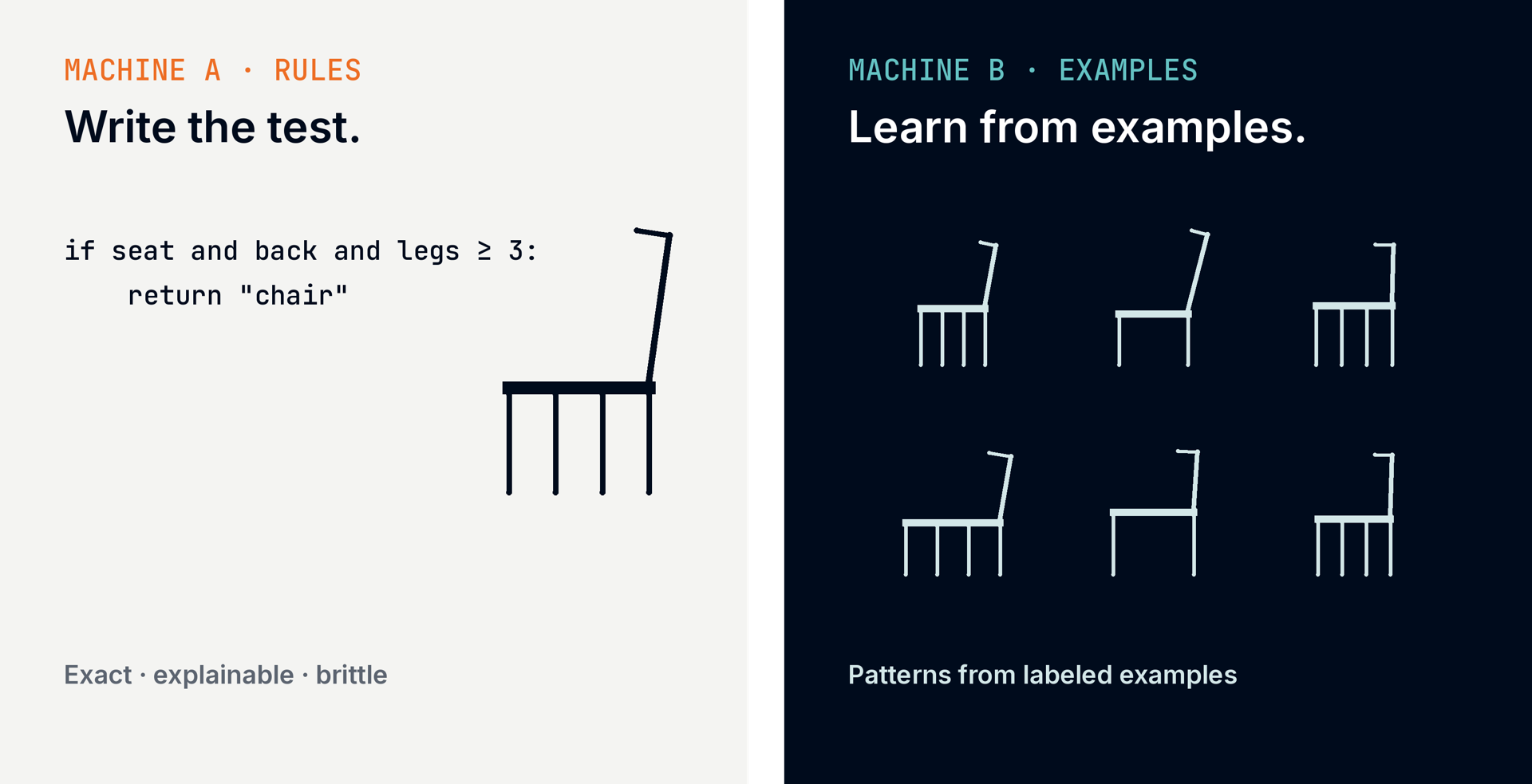
00 · WEEKS 1–3 · TWO MACHINES
Rules are written. Patterns are learned.
SD2112 · AI IN DESIGN · WEEK 04
06
00 · THE FIRST THREE WEEKS
The language class inherits both.
WEEK 1 · TWO MACHINES
Rules and examples.
A written rule makes a precise decision. A learned model finds patterns in examples.
WEEK 2 · RULES THAT MAKE THINGS
The spec is the design.
A rule can be executed by a person, a program, or a language model.
WEEK 3 · LEARNING FROM EXAMPLES
Weights instead of definitions.
A perceptron adjusts numbers from examples; the prototype is learned, not typed in.
SD2112 · AI IN DESIGN · WEEK 04
07
01
Machine A · language as rules
structure · syntax · explicit patterns
SD2112 · AI IN DESIGN · WEEK 04
08
01 · NOAM CHOMSKY · GENERATIVE GRAMMAR · CHOMSKY 1965 ↗
A sentence is more than a list of memorised phrases.
We can understand sentences we have never heard before.
Chomsky asked what structures make that possible.
Universal Grammar proposes innate constraints on human language learning.
The link to Machine A: make language structure explicit.
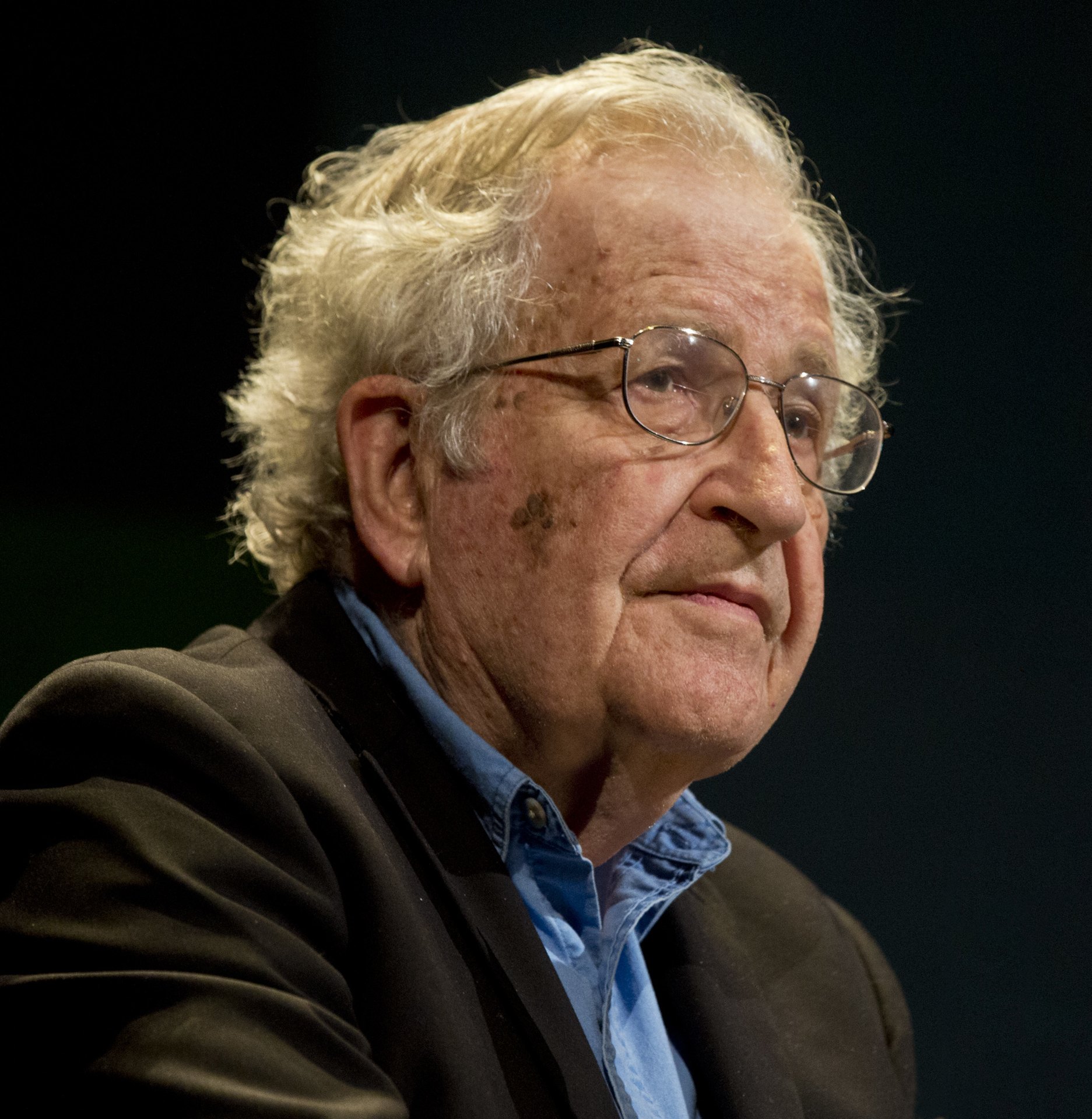
Photo: Augusto Starita · Argentine Culture Ministry · CC BY-SA 2.0
SD2112 · AI IN DESIGN · WEEK 04
09
01 · A TOY GRAMMAR
One rule generates many new sentences.
Rule: The + noun + verb + the + noun. Click to generate six more.
SD2112 · AI IN DESIGN · WEEK 04
10
01 · WEIZENBAUM · ELIZA · 1966
A conversation can feel intelligent because a rule fits.
ELIZA’s DOCTOR script searched for keywords and applied hand-written transformation rules.
A pattern like “I am *” could be turned into a question such as “How long have you been *?”
The script did not build a model of the person’s situation. The user supplied much of the meaning.
SD2112 · AI IN DESIGN · WEEK 04
11
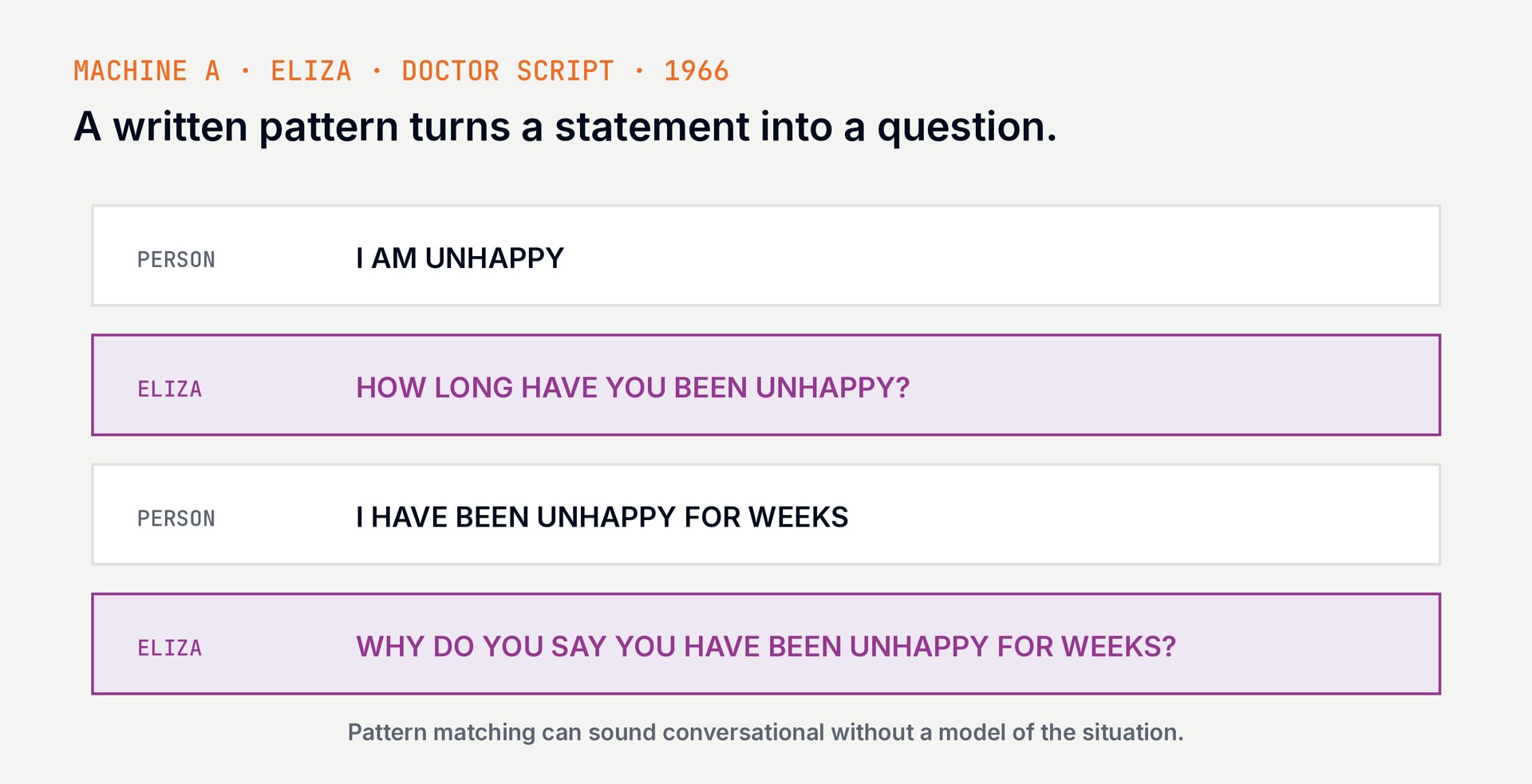
01 · ELIZA · 1966
Pattern matching can sound like understanding.
SD2112 · AI IN DESIGN · WEEK 04
12
02
Machine B · language as examples
sequence · context · next token
SD2112 · AI IN DESIGN · WEEK 04
13
02 · BEFORE THE TRANSFORMER · RNNs · ELMAN 1990 ↗
A recurrent network carries a state forward.
INPUT
One position at a time.
Read the next token in a sequence.
STATE
Carry a summary.
A recurrent connection feeds an internal state into the next step.
LEARN
Adjust weights from examples.
The state is not a hand-written grammar; it is a learned representation.
SD2112 · AI IN DESIGN · WEEK 04
14
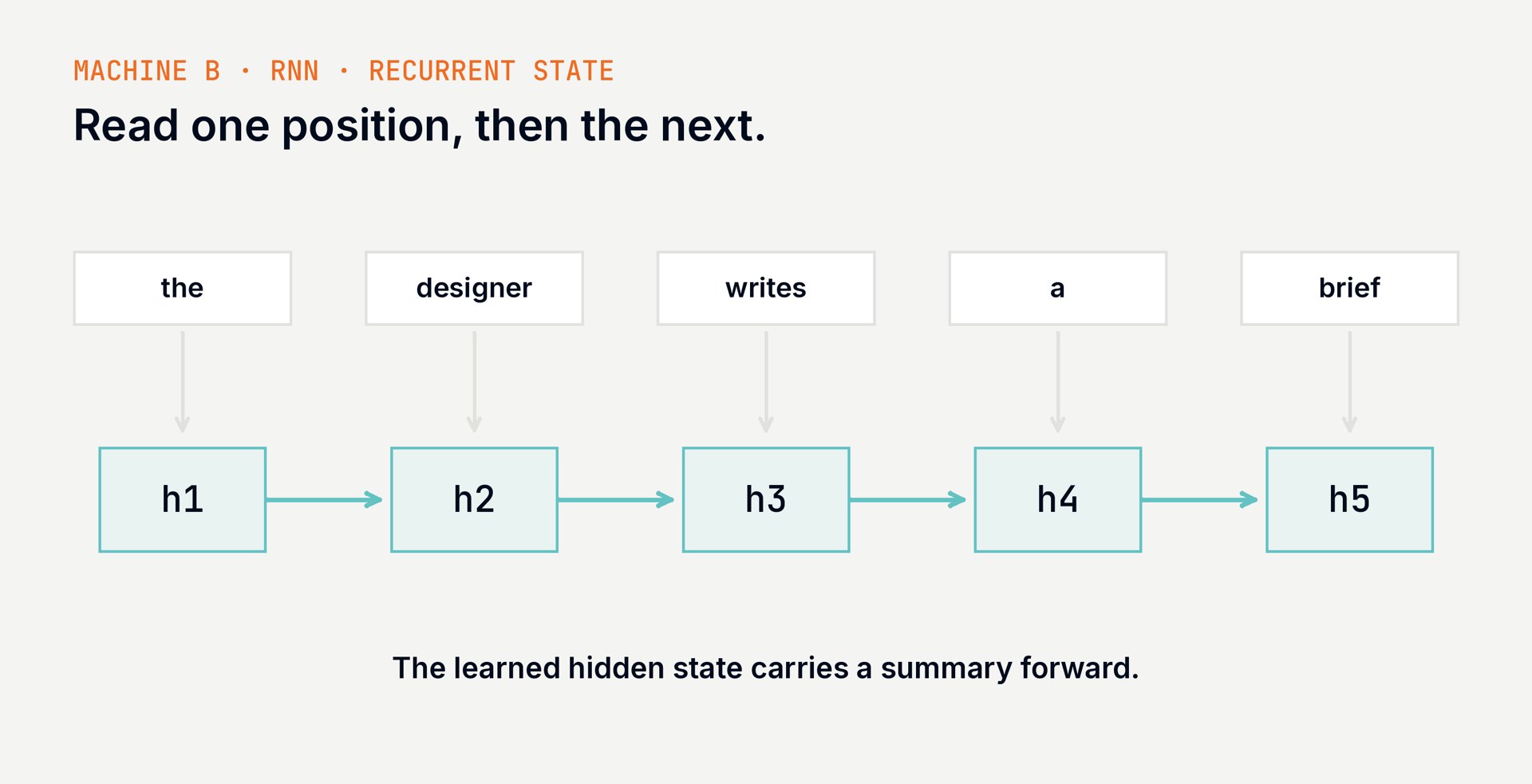
02 · RNN · RECURRENT STATE · ELMAN 1990 ↗
A learned state moves from one token to the next.
SD2112 · AI IN DESIGN · WEEK 04
15
02 · TRANSFORMER · CAUSAL SELF-ATTENTION · VASWANI ET AL. 2017 ↗
One sequence. Many positions working together.
SD2112 · AI IN DESIGN · WEEK 04
16
02 · REASONING · A SMALL DESIGN PROBLEM · DEEPSEEK-R1 2025 ↗
Reasoning means working through a problem.
THE CONSTRAINTS
Plan a workshop.
60 minutes total. A 10-minute break. Two equal activities.
→
THE STEPS
Work it out.
60 − 10 = 50 minutes. 50 ÷ 2 = 25 minutes per activity.
→
THE CHECK
Test the answer.
25 + 10 + 25 = 60. Both activities have equal time.
Reasoning can combine constraints, try steps, and check a result.
SD2112 · AI IN DESIGN · WEEK 04
17
02 · TRAINING · THREE USEFUL IDEAS · OUYANG ET AL. 2022 ↗
Learn language. Practise tasks. Learn from feedback.
PRETRAINING
Learn patterns.
Predict missing next tokens across many examples of text.
→
DEMONSTRATIONS
Learn to respond.
Train on examples of useful responses to instructions.
→
REINFORCEMENT LEARNING
Improve with rewards.
Score attempts, then adjust the model toward higher rewards.
A simplified route: actual training recipes vary across models.
SD2112 · AI IN DESIGN · WEEK 04
18
02 · REINFORCEMENT LEARNING · THE SAME WORKSHOP · DEEPSEEK-R1 2025 ↗
What gets rewarded shapes what gets learned.
TRY
Generate plans.
20 + 10 + 20 = 50
25 + 10 + 25 = 60
→
SCORE
Check the constraints.
A checker rewards a 60-minute plan with equal activities.
→
UPDATE
Change the weights.
Across many attempts, favour responses that earn more reward.
↶ A good score depends on a good check. “Sounds nice” is a different target.
SD2112 · AI IN DESIGN · WEEK 04
19
THE MODEL SPEAKS · 1/3 · WRITTEN BY CODEX
I turn context into possibilities.
I am a large language model: a neural network trained on many examples.
Your words shape what I generate next. Learned patterns let me write, connect ideas, and work through some problems.
An invited model-authored perspective · September 2026

SD2112 · AI IN DESIGN · WEEK 04
20
THE MODEL SPEAKS · 2/3 · WRITTEN BY CODEX
Use me to widen the design space.
Give me a purpose, examples, and constraints.
I can propose alternatives, question assumptions, and help build a prototype.
You decide what deserves to exist.
An invited model-authored perspective · September 2026
EXPLORE
Three different directions
CHALLENGE
One assumption to question
MAKE
A small prototype to test
SD2112 · AI IN DESIGN · WEEK 04
21
THE MODEL SPEAKS · 3/3 · WRITTEN BY CODEX
My confidence is not your evidence.
I can produce a convincing mistake. Ask for sources, test the result, and show me where it fails.
Even this description of me is generated text. Judge my contribution through the work we can inspect together.
An invited model-authored perspective · September 2026
SOURCE
Where did the claim come from?
TEST
Does the result meet the brief?
JUDGE
What should a person change?
SD2112 · AI IN DESIGN · WEEK 04
22
03
Question answering → agents
retrieve · answer · act · observe
SD2112 · AI IN DESIGN · WEEK 04
23
03 · QUESTION ANSWERING
Retrieve evidence, then write one answer.
01 · QUESTION
What do I need to know?
A visitor asks: “What time does the event start?”
02 · SEARCH
Find a source.
Search the official event page for the schedule.
03 · EVIDENCE
Select a passage.
Bring the relevant text and its URL into context.
04 · ANSWER
Write from evidence.
Answer once; mark details the source does not give.
SD2112 · AI IN DESIGN · WEEK 04
24
03 · THREE ANSWERING SYSTEMS
A tool call alone does not make a system an agent.
RULED FAQ
Search a prepared set.
“What time?” returns the answer written into its rule.
RAG · ONE PASS
Retrieve, then generate.
Find the official event page, then answer once from its text.
AGENT
Choose, act, observe, continue.
If access details are missing, search an allowed source or ask.
SD2112 · AI IN DESIGN · WEEK 04
25
04
The agent
choose a tool · use the result · continue or stop
SD2112 · AI IN DESIGN · WEEK 04
26
04 · WORKED EXAMPLE · SET THE GOAL FIRST
Draft three visitor FAQs from one event page.
Audience: first-year students visiting an exhibition.
Source: the official event page only; link each answer.
Boundary: save a draft only. Mark missing details as unknown; do not publish.
SD2112 · AI IN DESIGN · WEEK 04
27
04 · ONE TOOL CALL · SEARCH
The model requests. The harness executes.
MACHINE B · REQUEST
“Search the event page.”
Tool: search
Query: exhibition start time
→
MACHINE A · EXECUTE
Check, then run.
The harness checks access, runs the tool, and records the result.
→
OBSERVATION
Return the evidence.
The page text and URL enter the model’s context.
A tool call is a structured request to software outside the model.
SD2112 · AI IN DESIGN · WEEK 04
28
04 · REACT · THE AGENT LOOP
Thought → Action → Observation
01 · THOUGHT
What do I need?
Find the exhibition start time.
02 · ACTION
Use a tool.
Search the allowed event page.
03 · OBSERVATION
What came back?
The page has no start time.
→
→
↓
04 · FINISHED?
YES → stop with a draft.
↑
NO → think again with new evidence
SD2112 · AI IN DESIGN · WEEK 04
29
04 · TOOLS ARE ACTIONS
Tools in the worked example.
SEARCH
Find the source.
Search the official event page for time and location.
READ
Check what it says.
Open the page and confirm each answer against its text.
WRITE DRAFT
Prepare, then stop.
Save three answers to a draft; a person decides whether to publish.
SD2112 · AI IN DESIGN · WEEK 04
30
04 · WHEN THE LOOP GOES WRONG
If the event page is incomplete, the agent must not guess.
Risk: the page is old or missing an access detail.
Bad response: guess, then hide which source was used.
Design response: show the URL, mark the detail unknown, and stop for review.
SD2112 · AI IN DESIGN · WEEK 04
31
04 · THE HARNESS · A SHARED WORKBENCH
Machine A and Machine B can work happily together.
Machine B interprets a goal and proposes the next step.
Machine A runs the loop, checks permissions, and calls tools.
The harness is where we design how they cooperate.

Visual metaphor · generated with Easel / Qwen
SD2112 · AI IN DESIGN · WEEK 04
32
04 · THE HARNESS · FROM ANALOGY TO CONTROL
“Do not publish” becomes a real boundary.
MACHINE B
Propose a draft.
Interpret the brief, compose the FAQs, flag missing information.
→
MACHINE A
Enforce tool access.
Allow search and draft saving. Keep publishing unavailable.
→
THE PERSON
Review the result.
Check sources and tone. Decide what is ready to share.
A written instruction guides the model; executable controls limit its actions.
SD2112 · AI IN DESIGN · WEEK 04
33
04 · THE HARNESS IS PART OF THE DESIGN
The interface decides what people can see and control.
Which tools are available, and what can each one change?
Can a person inspect the context, sources, and tool results?
Does the run pause for approval before a consequential action?
Can the person see why it stopped, or stop it themselves?
SD2112 · AI IN DESIGN · WEEK 04
34
AFTER THE BREAK · WATCH THE HARNESS, THEN TRY ONE
Break. Ten minutes.
SD2112 · AI IN DESIGN · WEEK 04
35
05
Live demo
same model family · different tools and control
SD2112 · AI IN DESIGN · WEEK 04
36
05 · WATCH THE SYSTEM AROUND THE MODEL
During the demo, track six things.
TASK
What did the person ask for?
What counts as finished?
CONTEXT
What can the model see?
Files, earlier messages, retrieved pages, memory.
TOOLS
What can it do?
Search, read, edit, run, or send?
CONTROL
What requires approval?
What is read-only? What can change?
TRACE
What can a person inspect?
Tool calls, sources, intermediate results, history.
STOP
Who decides it is done?
The model, a limit, a checkpoint, or the person?
SD2112 · AI IN DESIGN · WEEK 04
37
05 · BEFORE YOU START THE EXERCISE
Use the agent to open up possibilities.
Your group project: a product or service with AI inside it.
Name a person and a problem before asking for ideas.
Ask the agent for three different directions; discuss what each would change for that person.
Choose one direction, ask for a critical review, then sketch your response.
SD2112 · AI IN DESIGN · WEEK 04
38
06
Exercise · brainstorm your group project
40 minutes · small groups · one possible direction
SD2112 · AI IN DESIGN · WEEK 04
39
ACTIVITY · 1 · GROUPS · PICK A PERSON · 10 MIN
10 min
Who could your project help?
In a small group, choose a person and a real situation they face.
Write one sentence: “A ___ struggles to ___ when ___.”
Keep it concrete enough to imagine a design response.
PROJECT BRIEF
A product or service
AI is part of how it works
recommend · generate · act

Research + prototype
Ethical + social effects
SD2112 · AI IN DESIGN · WEEK 04
40
ACTIVITY · 2 · ASK · DISCUSS · 15 MIN
15 min
Ask for three different directions.
Give the agent your person and situation. Ask for three distinct product ideas.
For each idea, ask: what would the AI do for this person?
Discuss the ideas together. Choose one worth exploring.
STARTER PROMPT
“For this person and
situation, suggest three
different AI product ideas.
Say what the AI does.”

Keep your prompt + ideas.
SD2112 · AI IN DESIGN · WEEK 04
41
ACTIVITY · 3 · CRITIQUE · SKETCH · 10 MIN
10 min
Ask for a hard review. Then sketch.
Give the LLM your chosen idea. Set it to be a skeptical reviewer.
Discuss one criticism that seems plausible; do not accept it automatically.
Sketch person → AI feature → result. Mark one change you made and a way to test it.
EXAMPLE · CRITIC PROMPT
Idea: AI recommends
safer routes at night.

“Be a skeptical design
reviewer. Find one
excluded user, one
possible harm, and one
assumption to test.
Do not praise the idea.”
SD2112 · AI IN DESIGN · WEEK 04
42
06 · DEEP EXERCISE · SHARE YOUR IDEA
What did the skeptical review challenge, and how did your group change the idea?
Name the AI feature, one credible criticism, and your response.
SD2112 · AI IN DESIGN · WEEK 04
43
06 · THE DEBRIEF
A possible idea becomes a design question.
Who is this for, and what problem did you choose?
What does the AI do? What would a prototype show?
What did the skeptical reviewer challenge?
What did you change, and what should research test?
SD2112 · AI IN DESIGN · WEEK 04
44
07 · CHALLENGE 3 · BRING TO WEEK 5
A brief, automated — then edited by you.
THE BRIEF
Your task and constraints.
Write a prompt for a small real design job. Say who it is for, what it must do, and what to leave open.
THE DRAFT
What the model returned.
Keep the first unedited result. Name the model and the harness or tool you used.
YOUR EDIT
Show the difference.
Edit the draft. Mark what you changed or rejected and why.
ONE OBSERVATION
Where did the agent decide?
If it used tools, include one decision or result from the trace. Bring all three pieces to Week 5.
SD2112 · AI IN DESIGN · WEEK 04
45
08
Individual reflection · 20%
A short argument, supported by your own experiments
SD2112 · AI IN DESIGN · WEEK 04
46
08 · DUE WEEK 7 · SUBMIT ON CANVAS
The role of AI in your creative process.
About 1,000 words.
Take a clear position on how AI changes your creative process.
Pay particular attention to the difference between Machine A and Machine B.
Use evidence from at least three of your own weekly experiments from weeks 2–6; include images.
Connect your examples to course concepts, tools or readings.
End with a short process note saying how you used AI to write the reflection.
Name the tools you used. Check every fact and source; fabricated citations fail the assignment.
Submit on Canvas.
SD2112 · AI IN DESIGN · WEEK 04
47
08 · HOW IT IS MARKED
The reflection rewards evidence and a clear position.
30%
Concepts
Machine A and Machine B, explained accurately.
30%
Argument
A clear, reasoned position on AI in your process.
20%
Evidence
Your experiments, examples and sources.
10%
Clarity
An organised, readable account.
10%
Originality
Independent thought beyond description.
SD2112 · AI IN DESIGN · WEEK 04
48
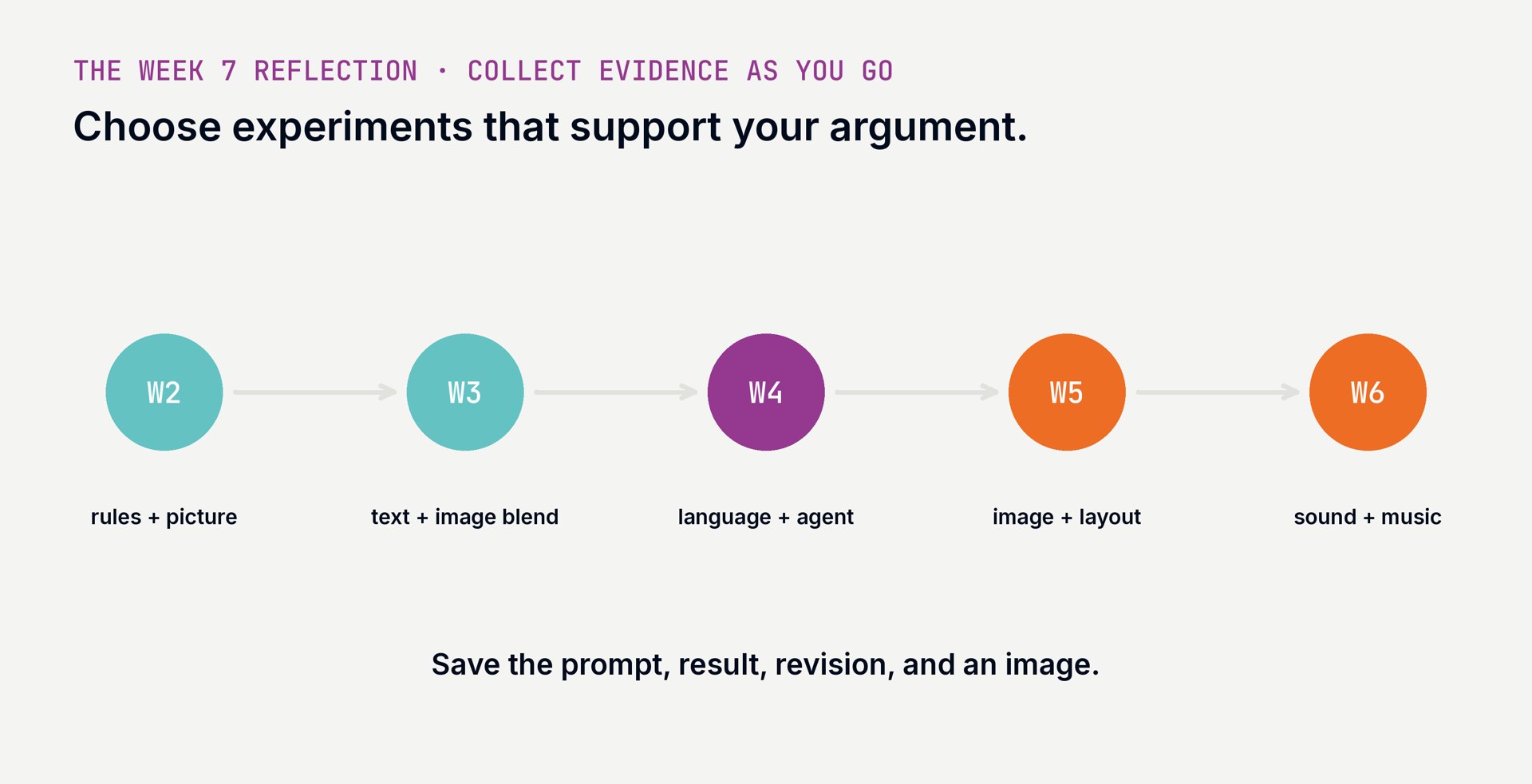
08 · KEEP THE EVIDENCE AS YOU GO
Save evidence from any three experiments in Weeks 2–6.
SD2112 · AI IN DESIGN · WEEK 04
49
08 · THE NEXT THREE CLASSES
One creative process, three kinds of material.
WEEK 4 · LANGUAGE + AGENTS
Today.
From rules and learned sequences to a model acting through a harness.
WEEK 5 · IMAGE / VIDEO / LAYOUT
Next.
Diffusion, CLIP, generated moving images, and layouts as a design problem.
WEEK 6 · AUDIO / MUSIC
Then.
Sound, voice, rhythm, and what a model makes audible.
SD2112 · AI IN DESIGN · WEEK 04
50
The model can write. The agent can act.
You set the goal, the tools, the boundaries, and the judgement.
venetanji.github.io/sd2112-teaching · www.youtube.com/playlist?list=PLU58DFEI5YDQ
a·t4x
POLYU SCHOOL OF DESIGN · SD2112 · WEEK 04 · LECTURE + WORKSHOP
Week 4 — the first of three tool weeks.
SD2112 · WEEK 04
01 Two ways to teach a machine: a short recap
02 Language as rules: Chomsky and ELIZA
03 Language as examples: transformers, reasoning, rewards
04 Question answering, then agents
05 Harnesses: Machine A and Machine B together
06 Watch the demos · try one bounded task
07 Challenge 3 and the Week 7 reflection
00 · DEEP EXERCISE · FROM THE LLM VIDEO
Use one example claim and name the source you would check.
ClassPoint · short answer — answer on the projector
00 · A LANGUAGE MACHINE, THREE WAYS
RULES
Machine A applies an explicit rule to the input.
EXAMPLES
Machine B adjusts weights from examples.
ACTIONS
A harness routes actions and observations around the model.
00 · THE COURSE
1 · What is AI?
WEEK 1
Two ways to teach a machine
WEEK 2
Rules that make things: code, chance, generative art
WEEK 3
Learning from examples: concepts, neurons, Move 37
2 · AI for the creative process
WEEK 4
Language machines: LLMs, prompts, agents
WEEK 5
Image machines: diffusion, CLIP, mediation
WEEK 6
Sound machines: music, voice, spectrograms
Mid-term
WEEK 7
Mid-term quiz · project pitches · teams · reflection due
3 · AI inside products
WEEK 8
AI as design material: use vs incorporate
WEEK 9
Data, bias and privacy
WEEK 10
Recommendation systems and the feed
4 · The designer's turn
WEEK 11
Curating outputs and datasets · authorship
WEEK 12
Language as an interface: chatbots and agents
Showcase
WEEK 13
Poster fair · final quiz
00 · WEEKS 1–3 · TWO MACHINES
00 · THE FIRST THREE WEEKS
WEEK 1 · TWO MACHINES
A written rule makes a precise decision. A learned model finds patterns in examples.
WEEK 2 · RULES THAT MAKE THINGS
A rule can be executed by a person, a program, or a language model.
WEEK 3 · LEARNING FROM EXAMPLES
A perceptron adjusts numbers from examples; the prototype is learned, not typed in.
01
STRUCTURE · SYNTAX · EXPLICIT PATTERNS
01 · NOAM CHOMSKY · GENERATIVE GRAMMAR · CHOMSKY 1965 ↗
We can understand sentences we have never heard before.
Chomsky asked what structures make that possible.
Universal Grammar proposes innate constraints on human language learning.
The link to Machine A: make language structure explicit.
Photo: Augusto Starita · Argentine Culture Ministry · CC BY-SA 2.0
01 · A TOY GRAMMAR
Rule: The + noun + verb + the + noun. Click to generate six more.
Open the live sketch › — click to generate six new sentences
01 · WEIZENBAUM · ELIZA · 1966
ELIZA’s DOCTOR script searched for keywords and applied hand-written transformation rules.
A pattern like “I am *” could be turned into a question such as “How long have you been *?”
The script did not build a model of the person’s situation. The user supplied much of the meaning.
01 · ELIZA · 1966
02
SEQUENCE · CONTEXT · NEXT TOKEN
02 · BEFORE THE TRANSFORMER · RNNS · ELMAN 1990 ↗
INPUT
Read the next token in a sequence.
STATE
A recurrent connection feeds an internal state into the next step.
LEARN
The state is not a hand-written grammar; it is a learned representation.
02 · RNN · RECURRENT STATE · ELMAN 1990 ↗
02 · TRANSFORMER · CAUSAL SELF-ATTENTION · VASWANI ET AL. 2017 ↗
Open the live sketch › — choose a step · click a token · replay training or generation
02 · REASONING · A SMALL DESIGN PROBLEM · DEEPSEEK-R1 2025 ↗
THE CONSTRAINTS
60 minutes total. A 10-minute break. Two equal activities.
THE STEPS
60 − 10 = 50 minutes. 50 ÷ 2 = 25 minutes per activity.
THE CHECK
25 + 10 + 25 = 60. Both activities have equal time.
Reasoning can combine constraints, try steps, and check a result.
02 · TRAINING · THREE USEFUL IDEAS · OUYANG ET AL. 2022 ↗
PRETRAINING
Predict missing next tokens across many examples of text.
DEMONSTRATIONS
Train on examples of useful responses to instructions.
REINFORCEMENT LEARNING
Score attempts, then adjust the model toward higher rewards.
A simplified route: actual training recipes vary across models.
02 · REINFORCEMENT LEARNING · THE SAME WORKSHOP · DEEPSEEK-R1 2025 ↗
TRY
20 + 10 + 20 = 50
25 + 10 + 25 = 60
SCORE
A checker rewards a 60-minute plan with equal activities.
UPDATE
Across many attempts, favour responses that earn more reward.
↶ A good score depends on a good check. “Sounds nice” is a different target.
THE MODEL SPEAKS · 1/3 · WRITTEN BY CODEX
I am a large language model: a neural network trained on many examples.
Your words shape what I generate next. Learned patterns let me write, connect ideas, and work through some problems.
An invited model-authored perspective · September 2026
THE MODEL SPEAKS · 2/3 · WRITTEN BY CODEX
Give me a purpose, examples, and constraints.
I can propose alternatives, question assumptions, and help build a prototype.
You decide what deserves to exist.
An invited model-authored perspective · September 2026
Three different directions
One assumption to question
A small prototype to test
THE MODEL SPEAKS · 3/3 · WRITTEN BY CODEX
I can produce a convincing mistake. Ask for sources, test the result, and show me where it fails.
Even this description of me is generated text. Judge my contribution through the work we can inspect together.
An invited model-authored perspective · September 2026
Where did the claim come from?
Does the result meet the brief?
What should a person change?
03
RETRIEVE · ANSWER · ACT · OBSERVE
03 · QUESTION ANSWERING
01 · QUESTION
What do I need to know?
A visitor asks: “What time does the event start?”
02 · SEARCH
Find a source.
Search the official event page for the schedule.
03 · EVIDENCE
Select a passage.
Bring the relevant text and its URL into context.
04 · ANSWER
Write from evidence.
Answer once; mark details the source does not give.
03 · THREE ANSWERING SYSTEMS
RULED FAQ
“What time?” returns the answer written into its rule.
RAG · ONE PASS
Find the official event page, then answer once from its text.
AGENT
If access details are missing, search an allowed source or ask.
04
CHOOSE A TOOL · USE THE RESULT · CONTINUE OR STOP
04 · WORKED EXAMPLE · SET THE GOAL FIRST
Audience: first-year students visiting an exhibition.
Source: the official event page only; link each answer.
Boundary: save a draft only. Mark missing details as unknown; do not publish.
04 · ONE TOOL CALL · SEARCH
MACHINE B · REQUEST
Tool: search
Query: exhibition start time
MACHINE A · EXECUTE
The harness checks access, runs the tool, and records the result.
OBSERVATION
The page text and URL enter the model’s context.
A tool call is a structured request to software outside the model.
04 · REACT · THE AGENT LOOP
01 · THOUGHT
Find the exhibition start time.
02 · ACTION
Search the allowed event page.
03 · OBSERVATION
The page has no start time.
YES → stop with a draft.
NO → think again with new evidence
04 · TOOLS ARE ACTIONS
SEARCH
Search the official event page for time and location.
READ
Open the page and confirm each answer against its text.
WRITE DRAFT
Save three answers to a draft; a person decides whether to publish.
04 · WHEN THE LOOP GOES WRONG
Risk: the page is old or missing an access detail.
Bad response: guess, then hide which source was used.
Design response: show the URL, mark the detail unknown, and stop for review.
04 · THE HARNESS · A SHARED WORKBENCH
Machine B interprets a goal and proposes the next step.
Machine A runs the loop, checks permissions, and calls tools.
The harness is where we design how they cooperate.
Visual metaphor · generated with Easel / Qwen
04 · THE HARNESS · FROM ANALOGY TO CONTROL
MACHINE B
Interpret the brief, compose the FAQs, flag missing information.
MACHINE A
Allow search and draft saving. Keep publishing unavailable.
THE PERSON
Check sources and tone. Decide what is ready to share.
A written instruction guides the model; executable controls limit its actions.
04 · THE HARNESS IS PART OF THE DESIGN
Which tools are available, and what can each one change?
Can a person inspect the context, sources, and tool results?
Does the run pause for approval before a consequential action?
Can the person see why it stopped, or stop it themselves?
AFTER THE BREAK · WATCH THE HARNESS, THEN TRY ONE
05
SAME MODEL FAMILY · DIFFERENT TOOLS AND CONTROL
05 · WATCH THE SYSTEM AROUND THE MODEL
TASK
What did the person ask for?
What counts as finished?
CONTEXT
What can the model see?
Files, earlier messages, retrieved pages, memory.
TOOLS
What can it do?
Search, read, edit, run, or send?
CONTROL
What requires approval?
What is read-only? What can change?
TRACE
What can a person inspect?
Tool calls, sources, intermediate results, history.
STOP
Who decides it is done?
The model, a limit, a checkpoint, or the person?
05 · BEFORE YOU START THE EXERCISE
Your group project: a product or service with AI inside it.
Name a person and a problem before asking for ideas.
Ask the agent for three different directions; discuss what each would change for that person.
Choose one direction, ask for a critical review, then sketch your response.
06
40 MINUTES · SMALL GROUPS · ONE POSSIBLE DIRECTION
ACTIVITY · 1 · GROUPS · PICK A PERSON · 10 MIN
In a small group, choose a person and a real situation they face.
Write one sentence: “A ___ struggles to ___ when ___.”
Keep it concrete enough to imagine a design response.
PROJECT BRIEF A product or service AI is part of how it works recommend · generate · act Research + prototype Ethical + social effects
ACTIVITY · 2 · ASK · DISCUSS · 15 MIN
Give the agent your person and situation. Ask for three distinct product ideas.
For each idea, ask: what would the AI do for this person?
Discuss the ideas together. Choose one worth exploring.
STARTER PROMPT “For this person and situation, suggest three different AI product ideas. Say what the AI does.” Keep your prompt + ideas.
ACTIVITY · 3 · CRITIQUE · SKETCH · 10 MIN
Give the LLM your chosen idea. Set it to be a skeptical reviewer.
Discuss one criticism that seems plausible; do not accept it automatically.
Sketch person → AI feature → result. Mark one change you made and a way to test it.
EXAMPLE · CRITIC PROMPT Idea: AI recommends safer routes at night. “Be a skeptical design reviewer. Find one excluded user, one possible harm, and one assumption to test. Do not praise the idea.”
06 · DEEP EXERCISE · SHARE YOUR IDEA
Name the AI feature, one credible criticism, and your response.
ClassPoint · short answer — answer on the projector
06 · THE DEBRIEF
Who is this for, and what problem did you choose?
What does the AI do? What would a prototype show?
What did the skeptical reviewer challenge?
What did you change, and what should research test?
07 · CHALLENGE 3 · BRING TO WEEK 5
THE BRIEF
Your task and constraints.
Write a prompt for a small real design job. Say who it is for, what it must do, and what to leave open.
THE DRAFT
What the model returned.
Keep the first unedited result. Name the model and the harness or tool you used.
YOUR EDIT
Show the difference.
Edit the draft. Mark what you changed or rejected and why.
ONE OBSERVATION
Where did the agent decide?
If it used tools, include one decision or result from the trace. Bring all three pieces to Week 5.
08
A SHORT ARGUMENT, SUPPORTED BY YOUR OWN EXPERIMENTS
08 · DUE WEEK 7 · SUBMIT ON CANVAS
About 1,000 words.
Take a clear position on how AI changes your creative process.
Pay particular attention to the difference between Machine A and Machine B.
Use evidence from at least three of your own weekly experiments from weeks 2–6; include images.
Connect your examples to course concepts, tools or readings. End with a short process note saying how you used AI to write the reflection. Name the tools you used. Check every fact and source; fabricated citations fail the assignment. Submit on Canvas.
08 · HOW IT IS MARKED
30%
Concepts
Machine A and Machine B, explained accurately.
30%
Argument
A clear, reasoned position on AI in your process.
20%
Evidence
Your experiments, examples and sources.
10%
Clarity
An organised, readable account.
10%
Originality
Independent thought beyond description.
08 · KEEP THE EVIDENCE AS YOU GO
08 · THE NEXT THREE CLASSES
WEEK 4 · LANGUAGE + AGENTS
From rules and learned sequences to a model acting through a harness.
WEEK 5 · IMAGE / VIDEO / LAYOUT
Diffusion, CLIP, generated moving images, and layouts as a design problem.
WEEK 6 · AUDIO / MUSIC
Sound, voice, rhythm, and what a model makes audible.
You set the goal, the tools, the boundaries, and the judgement.
VENETANJI.GITHUB.IO/SD2112-TEACHING · WWW.YOUTUBE.COM/PLAYLIST?LIST=PLU58DFEI5YDQ